
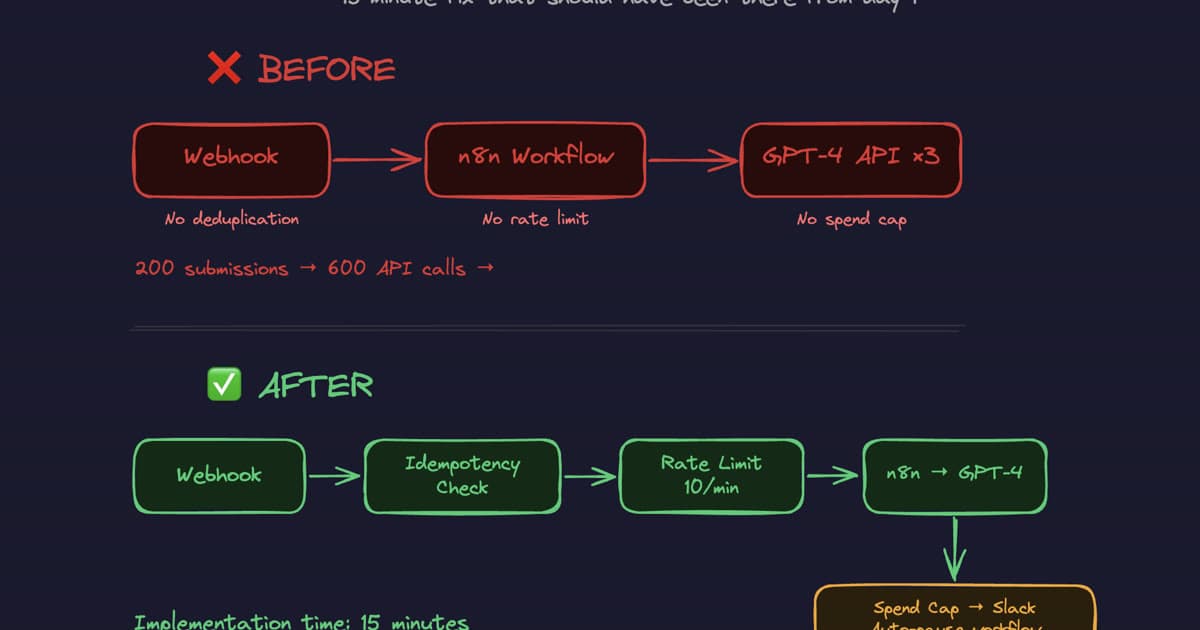
A client's n8n workflow burned $400 in API credits in 11 minutes.
Nobody noticed until the invoice arrived.
Here's what happened.
The Setup
A webhook triggered a workflow that called GPT-4 to process incoming form submissions. Standard stuff. Worked perfectly for three weeks.
Then someone tested the form with a script.
200 submissions in under a minute.
No deduplication. No rate limit. No spending cap.
The workflow processed every single one. Each submission made 3 API calls.
200 submissions × 3 API calls = 600 API calls. 11 minutes. $400 gone.
The automation was "working." That was the problem.
Why This Happens
There's a specific failure mode in n8n setups that nobody talks about until it's too late:
Working in development is not the same as being safe in production.
In development, you test it manually. One submission. It processes. The output looks right. You ship it.
What you never tested:
- What happens when 200 requests arrive at once
- What happens when the same payload hits the webhook twice
- What happens when your API spend doubles in a day
Most n8n users learn this the hard way. The only variable is how expensive the lesson is.
🚨 Danger
An automation that works is not the same as an automation that is production-ready. The gap between those two things has a price — and you pay it the first time something unexpected happens at scale.
The 3-Part Fix (15 Minutes Total)
Here's exactly what was added to make this workflow production-safe.
Fix 1 — Idempotency Key on the Webhook (~5 minutes)
Every incoming webhook payload now carries a unique identifier (a submission ID, a timestamp hash, or a UUID generated at the form level). Before the workflow does anything, it checks whether it has already processed that identifier.
If it has — it drops the request silently. No processing, no API call, no cost.
In n8n: Add an "If" node immediately after the webhook trigger. Check a static data store (n8n's built-in static data or Redis if you're running self-hosted) for the payload ID. If found, route to a "No Operation" node and stop. If not found, write the ID to the store and continue.
This alone would have reduced 200 submissions to 1.
Fix 2 — Rate Limit on Workflow Executions (~5 minutes)
n8n doesn't have a native global rate limiter, but you can implement one with a combination of:
- Wait nodes to enforce a minimum interval between executions
- Queue mode (if running self-hosted) to cap concurrent executions
- A Redis counter that increments per minute and rejects requests once a threshold is hit
The implementation used here: a simple counter in n8n static data that resets every 60 seconds. If the counter exceeds 10, the workflow routes to a "Rate Limited" branch and returns a 429-style error without processing.
Result: Even if 200 submissions arrive at once, a maximum of 10 get processed per minute. The rest are rejected or queued.
Fix 3 — Daily Spend Cap with Automatic Pause and Slack Alert (~5 minutes)
OpenAI and most LLM providers have spend limits you can set at the account or project level. Set one. This is not optional.
Additionally — at the workflow level, a spend estimation node was added:
- Before each GPT-4 call, estimate the token count of the input
- Maintain a rolling daily cost estimate in static data
- If the estimated daily spend exceeds a threshold, pause the workflow and send a Slack alert before making the API call
This is a belt-and-suspenders approach. The API-level spend cap is your hard stop. The workflow-level estimation is your early warning.
💡 Tip
Set your API spend cap at roughly 2× your expected daily maximum. Low enough to catch runaway costs, high enough not to interrupt normal operation. The workflow-level alert should fire at 80% of that number.
The Before and After
Before: Webhook → n8n Workflow → GPT-4 API ×3
- No deduplication at the webhook
- No rate limit on the workflow
- No spend cap anywhere
After: Webhook → Idempotency Check → Rate Limit (10/min) → n8n → GPT-4 → Spend Cap → Slack Auto-Pause
The implementation time was 15 minutes. The $400 loss was not.
The Real Cost Wasn't $400
The $400 was recoverable. What wasn't recoverable was the 3 weeks the workflow ran in production with zero guardrails, during which time anyone could have triggered the same scenario — or worse.
The assumption that "it works" means "it's safe" is the most expensive assumption in automation.
Every workflow I deploy at Quinji now ships with three things before anything else goes live:
- Rate limits on every trigger — no workflow accepts unbounded input
- Spend caps with automatic pause — cost runaway has a hard ceiling
- Deduplication on every input — no payload is processed twice
None of these are complex. All of them are skipped in 90% of the setups I audit.
⚠️ Warning
If your n8n workflow doesn't have all three of these in place, it isn't production-ready. It's a loaded gun pointed at your API invoice.
Checklist: Before You Ship Any n8n Workflow
Use this before marking any workflow as "live":
- Idempotency — Does the workflow handle duplicate payloads without double-processing?
- Rate limiting — Is there a maximum execution rate per minute/hour?
- Spend cap — Is there an API-level spend limit set on the provider account?
- Workflow-level cost tracking — Is the workflow estimating and tracking its own spend?
- Error alerting — Does someone get notified if the workflow fails or hits a limit?
- Load testing — Was the workflow tested with 10× expected volume before going live?
If any of these are unchecked, you haven't shipped a production workflow. You've shipped a demo that happens to be running in production.
The fix for this specific client took 15 minutes. The audit that identified the gap took 20. For most n8n setups, the same issues show up in the same places.
If you want a production-readiness review of your current automation setup — or if you're building something new and want the guardrails in from day one — the AI automation packages cover exactly this, or book a call and we'll walk through your specific setup.
Tags